> ## Documentation Index
> Fetch the complete documentation index at: https://developers.candu.ai/llms.txt
> Use this file to discover all available pages before exploring further.
# Core entities
> Understand Candu content, placements, segments, and documents.
 ## Content
Identifier: `contentId`
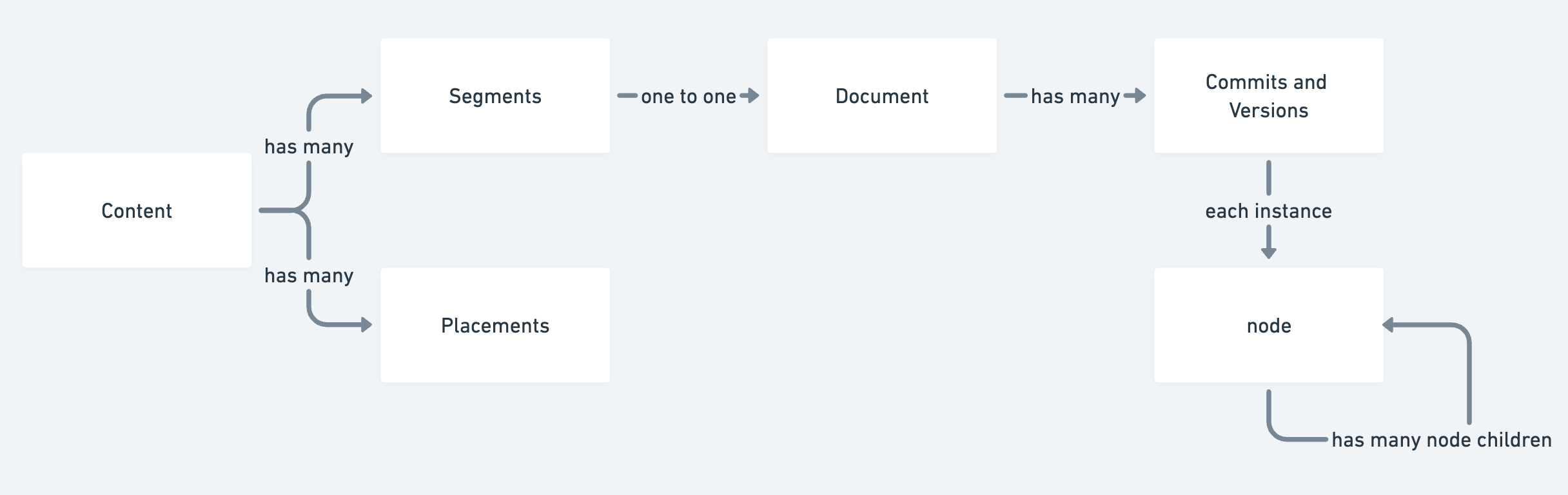
A content is Candu's core entity. Contents can have many different types, such as `Inline`, `Modal`, `Tour` or `HotspotGroup`. Each Content can be Live or Published.
Content can also be used inside other pieces of Content as an `Embed`, so that you can create complex nested logic.
## Placement
Identifier: `placementId`
Placements are responsible for showing the right Content in the right place. Each Content can have multiple placements, which in turn can have multiple URL rules and selectors. Selectors can be reused across multiple pieces of Content.
## Segment
Identifier: `segmentId`
Segments are a set of users. Segments are used to target users and to create dynamic content.
The "Everyone" Segment contains all your users and has `segmentId=Everyone`.
A Content can be targeted to any number of Segments, each one will have their own document. A user will be shown the first Segment they match.
## Document
Identifier: `documentId`
A Document is responsible for maintaining version history, commit log and publishing state for a given set of nodes.
The exact `versionId` can be accessed in all the tracking calls, in case you want to track version changes. `VersionIds` are `sha1` hashes.
## Components and Node
Identifier: `nodeId`
Components are logical grouping of nodes. For example, a `Checklist` component contains two types of nodes, `ChecklistGroup` and `ChecklistItem`.
Nodes are organised in a tree data structure, and are created to reflect how the DOM works.
A `nodeId` is not unique across Candu, but the combination of `documentId` and `nodeId` is.
This documentation is built and hosted on [Mintlify](https://mintlify.com), a developer documentation platform.
## Content
Identifier: `contentId`
A content is Candu's core entity. Contents can have many different types, such as `Inline`, `Modal`, `Tour` or `HotspotGroup`. Each Content can be Live or Published.
Content can also be used inside other pieces of Content as an `Embed`, so that you can create complex nested logic.
## Placement
Identifier: `placementId`
Placements are responsible for showing the right Content in the right place. Each Content can have multiple placements, which in turn can have multiple URL rules and selectors. Selectors can be reused across multiple pieces of Content.
## Segment
Identifier: `segmentId`
Segments are a set of users. Segments are used to target users and to create dynamic content.
The "Everyone" Segment contains all your users and has `segmentId=Everyone`.
A Content can be targeted to any number of Segments, each one will have their own document. A user will be shown the first Segment they match.
## Document
Identifier: `documentId`
A Document is responsible for maintaining version history, commit log and publishing state for a given set of nodes.
The exact `versionId` can be accessed in all the tracking calls, in case you want to track version changes. `VersionIds` are `sha1` hashes.
## Components and Node
Identifier: `nodeId`
Components are logical grouping of nodes. For example, a `Checklist` component contains two types of nodes, `ChecklistGroup` and `ChecklistItem`.
Nodes are organised in a tree data structure, and are created to reflect how the DOM works.
A `nodeId` is not unique across Candu, but the combination of `documentId` and `nodeId` is.
This documentation is built and hosted on [Mintlify](https://mintlify.com), a developer documentation platform.